AI Agents and MCP Servers vs. WordPress: No CMS Needed
AI agents connected through MCP can write and publish posts directly, skipping WordPress and CMS logins. Here's why that's faster, and where it still falls short.

AI Agents and MCP Servers vs. WordPress: No CMS Needed
The CMS Was Never the Point
For twenty years, “publishing a website” has meant the same ritual: open wp-admin, click through a rich text editor, wrestle with a page builder, hunt for the right plugin, hit publish, wait for a cache to clear. WordPress made that ritual accessible to non-developers, and that’s a real achievement — it still powers a huge share of the web for good reason. But the ritual itself was always a workaround. A CMS exists to solve one problem: give a human a UI so they can safely turn an idea into a file on a server without touching code. That’s it. It’s an interface layer bolted onto content storage.
In 2026, that interface layer is starting to look optional. If an AI agent can write good copy and safely turn that copy into a published page by itself, the UI you built for a human typing into a textarea stops being the bottleneck — it becomes overhead. This post is about why that shift is happening now, what MCP (Model Context Protocol) actually changes, and where a git-based, agent-native publishing setup beats a traditional CMS — including WordPress’s own new AI integrations.
What Actually Changed in the Last Year
AI writing assistance inside a CMS isn’t new. Plugins have offered “AI content generation” for years — you’d get a draft, then still copy it into the editor, format it, pick categories, and click publish yourself. The AI was a typing assistant, not an operator.
What changed is write access. Model Context Protocol gave AI clients like Claude or ChatGPT a standard way to call real tools — not just generate text, but execute actions with defined permissions. Once a platform exposes an MCP server with tools like “create post” or “publish page,” an agent stops being a drafting assistant and becomes an operator that can complete the entire workflow: research the topic, write the piece, pick the right category, generate the metadata, and ship it — in one conversation, with no hand-off to a human clicking buttons in an admin panel.
Major platforms have leaned into this. WordPress.com opened its MCP server from read-only access to full write access in early 2026, letting connected agents draft and publish posts, pages, and structural changes. Automattic has openly framed WordPress as infrastructure for the “agentic web.” That’s a meaningful shift, and it says something important: even the biggest CMS in the world is admitting the browser-based admin panel isn’t the future interface for content creation. Agents are.
But there’s a difference between adding an agent-friendly door to an existing CMS and not needing the CMS’s machinery at all. That difference is where things get interesting.
Where MCP Actually Fits
MCP is the connective layer between a model and the outside world. Without it, an AI tool can only produce text in a chat window — you still have to be the courier, copying that text somewhere it becomes real. With an MCP server sitting in front of your content, the model gets tools it can call directly: list existing posts, create a new one, validate a slug, rebuild a sitemap, run a build, push to git.
That’s the whole trick. The “content management” part of a CMS — categorizing, versioning, avoiding duplicate slugs, regenerating feeds — doesn’t need a database and an admin UI to exist. It needs a small set of well-defined functions. An MCP server is exactly that: a thin, permissioned API surface over your content, callable by any AI client that speaks the protocol. You get the governance a CMS promised (validation, consistent schema, no orphaned links) without the weight of a CMS (a server process, a database, a login screen, a plugin ecosystem to keep patched and secure).
Git-Based Publishing vs. CMS-in-the-Loop
Here’s the part that matters most for anyone actually running a site: where does the content live, and how does an agent read and write it?
In a traditional CMS, content lives in a database behind a REST API. An agent that wants to check what’s already published has to authenticate, paginate through API calls, and reconstruct your content library one request at a time. Every read costs a network round trip. Every write risks a partial failure halfway through a multi-step operation. And if you ever want to switch hosts or CMS platforms, you’re stuck exporting from a proprietary schema and hoping nothing breaks.
In a git-based setup, content is just files — markdown or structured JSON, sitting in the same repository as the code that renders it. An agent (or a human) can read the entire content library in one shot, because it’s already sitting in the filesystem. There’s no API surface to authenticate against just to know what already exists. Every change is a commit, which means every change is reviewable, revertible, and diffable — you get an audit trail for free, something most CMS platforms bolt on as a paid “revision history” feature. When an agent deletes a post, it can grep the rest of the codebase for dangling references in the same operation, because everything it needs is right there in the working tree, not locked behind a separate admin API.
This isn’t a knock on WordPress specifically — it’s a structural point about any database-backed CMS versus content that lives as plain files next to your code. As AI agents do more of the actual publishing work, the format that’s cheapest and most reliable for an agent to read and write in bulk starts to matter as much as the format that’s easiest for a human to click through in a browser.
Why Skipping the CMS Is Faster, Not Just Simpler
“No CMS” sounds like it should mean “less capable.” In practice, for a workflow where an AI agent is doing the writing, it usually means less friction:
- One conversation, one publish. You describe the topic to Claude or ChatGPT, the agent researches it, writes it, picks a category, generates SEO metadata, and calls a publish tool — no copy-pasting into an editor, no separate login, no plugin settings to configure first.
- No plugin surface to secure. A chunk of WordPress security advisories every year trace back to third-party plugins, not WordPress core. A file-based, MCP-driven pipeline has a much smaller attack surface because there’s no plugin marketplace sitting between your content and the internet.
- Builds catch mistakes before they ship. Because the site is built from source files, a broken internal link or malformed post fails the build instead of quietly going live with a 404 behind it. A database-backed CMS will happily save inconsistent data; a build step won’t compile it.
- Version control is the review process. You don’t need a separate “draft vs. published” workflow bolted onto a database. A post that isn’t committed and pushed isn’t live. A post you want to roll back is a
git revertaway.
None of this requires exotic tooling. It requires content stored as files, a build step that validates them, and an MCP server that exposes “create,” “list,” “delete,” and “publish” as callable tools instead of hiding them behind a web form.
The SEO Angle: Fewer Moving Parts, Fewer Failure Points
SEO advice usually focuses on keywords and backlinks, but a lot of real-world ranking damage comes from mundane technical failures: a sitemap that doesn’t update, an RSS feed that goes stale, orphaned internal links pointing at deleted pages, inconsistent metadata across posts. Every one of those is a side effect of the “publish” step not being atomic.
When publishing is a single tool call that (1) writes the content file, (2) regenerates the sitemap and RSS feed, and (3) rebuilds the site before anything ships, those failure modes mostly disappear — because they’re handled by code every single time, not by a human remembering to update three separate things after adding a post. An agent that deletes a post and automatically strips references to it elsewhere in the site is doing basic technical SEO hygiene as a side effect of the deletion, not as a separate task someone has to remember to do later.
There’s also a newer angle worth naming directly: AI answer engines and crawlers increasingly favor sites that expose clean, structured, machine-readable content — think llms.txt, consistent JSON-LD, predictable URL structures. A pipeline where every post is generated from a defined schema produces that consistency automatically. A decade of hand-edited WordPress posts, each formatted slightly differently by whoever wrote it, usually doesn’t.
What You Give Up
It’s worth being honest about the trade-offs, because “no CMS” isn’t free:
- No visual editor. If your team includes non-technical writers who want to drag blocks around in a page builder, a file-based pipeline is a worse fit — at least until the agent interface is genuinely good enough to replace that for them too.
- You need a build and deploy pipeline. Someone has to set up the git repo, the build step, and the hosting connection once. That’s a one-time cost, but it’s a real one, and it assumes basic git fluency somewhere in the loop.
- Non-technical stakeholders lose a familiar interface. A marketing lead who’s used wp-admin for a decade will need a different mental model — “tell the agent what you want” instead of “open the editor.”
- Agent permissions need real guardrails. Write access for an AI agent is powerful and needs the same care as write access for a junior employee: scoped tools, confirmation steps for destructive actions, and a review step before anything irreversible happens.
For a solo founder or a small technical team, these trade-offs are easy to accept. For a large editorial team with non-technical contributors, they’re a real reason to stick with a traditional CMS — or to use one of the CMS platforms now adding proper MCP support on top of their existing editor, so both workflows can coexist.
What a Minimal Agent-Native Publishing Stack Looks Like
In practice, the pieces are small:
- Content as files. Markdown or JSON in a git repo, following one consistent schema (title, description, category, body).
- A static site generator. Something that turns those files into pages at build time, so a malformed post fails the build instead of shipping broken.
- An MCP server exposing a handful of tools. Create, list, delete, build, publish — each one scoped, each one auditable.
- A git-connected host. Push to
main, host auto-deploys. No separate “publish” button to click in a second system.
That’s the entire stack. No database to back up, no plugin updates to schedule, no admin login to secure against brute-force attempts.
Getting Started This Week
You don’t need to rebuild your whole site to try this. Pick one small piece of content — a changelog, a single blog category, a docs section — and move it to files in a git repo with a basic build step. Wire up a minimal MCP server with just two tools: create and list — see MCP development for what that build actually involves, grounded in a real, live example rather than just the concept. Connect Claude or ChatGPT to it and ask it to draft and publish something real. Or skip the pilot and migrate the whole site at once — see AI-agentic website development for what that involves.
The point isn’t that CMS platforms are obsolete — WordPress isn’t going anywhere, and its own move toward MCP support proves the admin panel isn’t disappearing overnight. The point is that for a growing slice of publishing work, the fastest path from “idea” to “live page” no longer runs through a browser tab and a login screen. It runs through a conversation with an agent that already has the tools it needs to finish the job.
MCP Went Stateless: The 2026-07-28 Spec Change, Explained
MCP Went Stateless: The 2026-07-28 Spec Change, Explained
MCP's 2026-07-28 revision removed sessions and the initialize handshake. Here's what changed, why it matters on Workers, and what our own MCP server does about it.

Three Gotchas From Making a Worker Agent-Ready
Three Gotchas From Making a Worker Agent-Ready
A self-fetch that needs two different mechanisms depending on the URL, a JWS signature Node signs the wrong way by default, and zod schemas that quietly drift from real code.
Markdown vs HTML: What AI Actually Cites (Real Data)
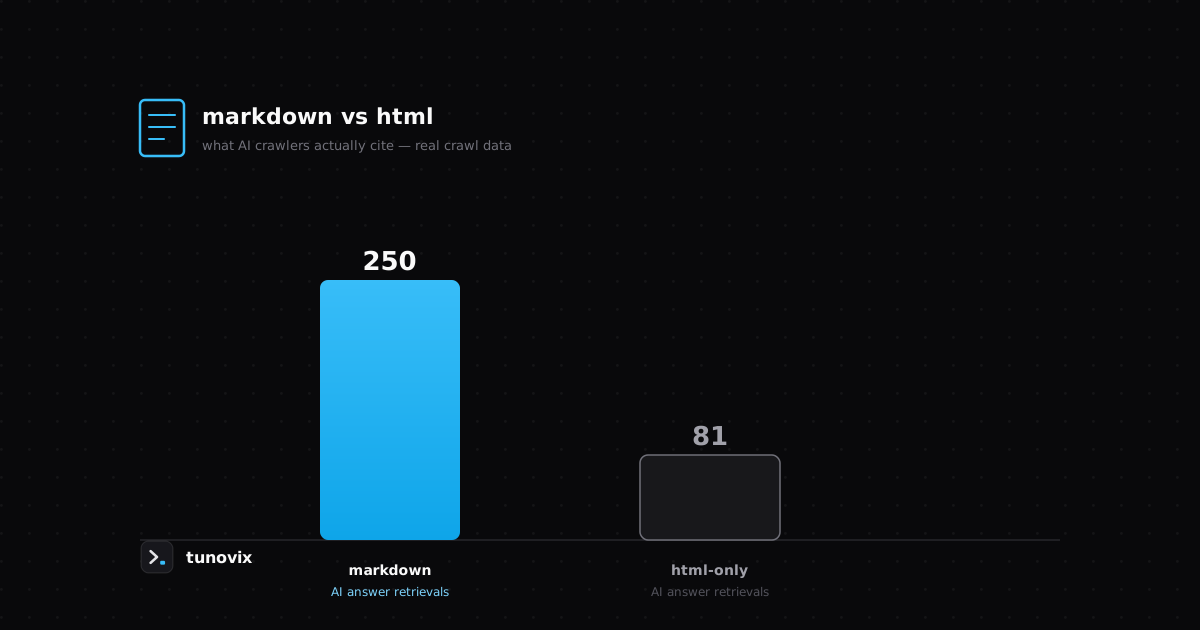
We compared markdown mirrors against a comparable HTML-only site using real Cloudflare crawl data — here's the actual difference in AI citations, not a guess.
Have a product in mind? Let's scope it this week.
A 30-minute call gets you a rough timeline and cost — no obligation, no sales deck.