A Small MCP Server Skips the Ticket Queue
A small, narrowly scoped MCP server lets a client fix bugs, copy, and layout by chatting with their AI assistant — no tickets, no CMS, just a PR to review.

A Small MCP Server Skips the Ticket Queue
The Ticket Was the Slowest Part of the Fix
A client of ours kept running into the same small friction: a typo in a hero headline, a button overlapping the price on mobile, a paragraph that needed to say something slightly different. None of it was hard to fix. All of it went through a ticket, or a CMS login, or a screenshot sent over chat with “can someone look at this.”
The fix always took minutes. Getting the fix started took a ticket, a triage, and a wait.
What we actually built
Instead of adding another project management tool to the pile, we built a small MCP server scoped to this one project. It plugs into the AI chat assistant the client already uses every day for everything else, and it exposes a narrow, deliberate set of tools:
- read specific files in the site’s codebase
- propose a diff against them
- open a branch
- open a pull request
That’s close to the whole surface area. No shell access, no arbitrary file writes, no deploy credentials, no ability to touch anything outside the repo it’s scoped to.
What changed for the client
Now a fix starts with a message, not a ticket. The client describes the problem the way they’d describe it to a person — “the pricing text is overlapping the button on mobile” — and the assistant reads the relevant files through the MCP server, drafts a change, and opens a pull request.
We get a notification, review the diff (usually small enough to read in ten seconds), and merge it to production if it looks right. No ticket was filed. No CMS admin panel was opened. Nobody had to learn the difference between a “block,” a “module,” and a “page” in someone else’s content model.
Why the scope stays narrow
The tools the server exposes are deliberately boring:
- it can’t merge its own pull requests
- it can’t touch secrets, environment variables, or deploy keys
- it can’t push directly to the production branch
- every change is a diff a human reads before it ships
That last part matters more than it sounds. The point isn’t to remove review — it’s to remove everything before review that wasn’t adding value. The ticket, the login, the back-and-forth to clarify what “the button” meant. Review stays. The friction around review doesn’t.
Where the limits are
This setup is honestly not the right shape for everything. It works well for small, contained changes — copy, layout, minor bugfixes — where the blast radius of a bad diff is small and easy to spot in review. It’s not a replacement for planning a real feature, and it’s not something we’d hand a wider set of write access without thinking hard about it first. The trust here comes from the server doing very little, not from the AI being trustworthy in the abstract.
What’s next: wiring MCPs together
Right now this server does one job. The next iteration is connecting it to a couple of other MCP servers already in use elsewhere in the workflow — one that surfaces design tokens, one that has visibility into page analytics — so a single conversation can pull the context it needs, propose a change informed by it, and open the pull request, without the client hopping between separate tools to gather that context themselves.
Each piece stays narrow and single-purpose. What changes is that the AI chat assistant becomes the one place the client has to go, regardless of how many small, boring services are actually doing the work behind it.
If you’re maintaining a site for a client who dreads the “how do I even request this” step more than the fix itself, this is worth trying on the smallest, lowest-risk part of the project first. Scope the tools tightly, keep review in the loop, and see how much of the ticket queue was never actually necessary.
MCP Went Stateless: The 2026-07-28 Spec Change, Explained
MCP Went Stateless: The 2026-07-28 Spec Change, Explained
MCP's 2026-07-28 revision removed sessions and the initialize handshake. Here's what changed, why it matters on Workers, and what our own MCP server does about it.
Three Gotchas From Making a Worker Agent-Ready
Three Gotchas From Making a Worker Agent-Ready
A self-fetch that needs two different mechanisms depending on the URL, a JWS signature Node signs the wrong way by default, and zod schemas that quietly drift from real code.
Markdown vs HTML: What AI Actually Cites (Real Data)
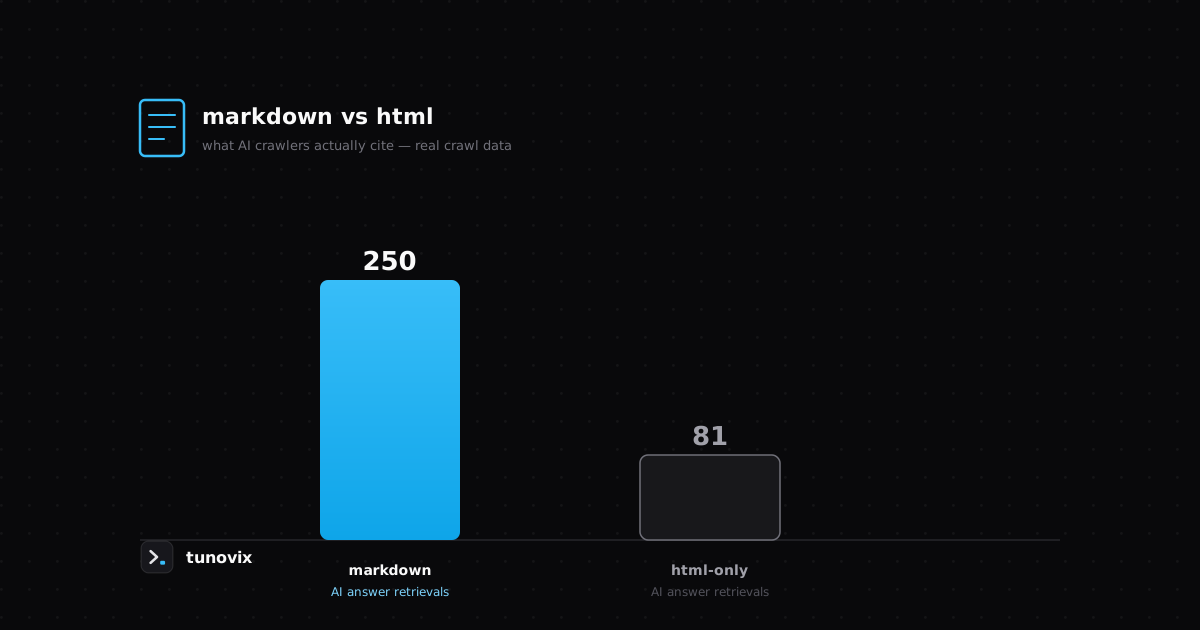
We compared markdown mirrors against a comparable HTML-only site using real Cloudflare crawl data — here's the actual difference in AI citations, not a guess.
Have a product in mind? Let's scope it this week.
A 30-minute call gets you a rough timeline and cost — no obligation, no sales deck.